
First: why the printer stopped
Every head cleaning and every borderless print sends a little ink to absorbent pads inside the printer. The printer counts it. At the limit it stops and shows “Service Required”, “The printer’s ink pads are at the end of their service life”, or blinking lights. What this message means.
There are two parts to the fix: the counter, which a reset program clears, and the pads, which still hold the ink. The three ways below differ in how they handle each.
VNIT Reset Tool is our own tool, so we list it first. For the other two, we only use facts that the makers publish themselves.
Way 1: VNIT Reset Tool
Good fit if: you want to fix it yourself today, on a Windows PC or a Mac, and see the real counter before paying.
- Runs on: Windows 10 and 11, Windows 7 and 32-bit Windows, and macOS 11 or newer (Intel and Apple silicon). No installer.
- Connects: by USB cable. Wi-Fi works on a few models only; most, including the L5290 and ET-2800, need the cable.
- Free: downloading, reading the counter, and one trial reset per printer (from 90% or more down to 80%).
- Full reset to 0%: a US$6 key for one printer. The key is emailed straight after payment. Pricing.
- Needs: an internet connection, because it downloads the settings for your exact model.
How it goes:
- Download and open the tool. On a Mac, confirm it the first time.
- Connect the printer, switch it on, press Read counter.
- Run the free trial, or enter a key on the License screen and press Reset all.
- Switch the printer off and on.
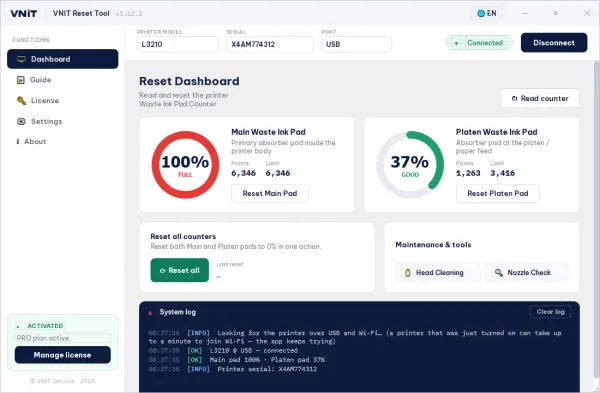
First check that your model is in supported printers. Full steps are in the user guide.
Way 2: another reset program (for example WIC Reset Utility)
Good fit if: your model is on that program’s list, or you already use it.
WIC Reset Utility is a third-party program for Epson and Canon inkjet printers. Its maker publishes these facts:
- Runs on: Windows and macOS (the Mac version is called iWIC).
- Free: downloading and checking the waste ink counters.
- Reset: with a paid Reset Key. A trial key resets the counter to 80%, once per printer.
Check the maker’s supported printer list and current prices on its own website before you buy.
Way 3: Epson service, or a technician who replaces the pads
Good fit if: the printer is still under warranty, or the pads are soaked and you do not want to open the printer yourself.
- On its US support site, Epson points customers to its ink pad replacement service, which includes shipping to and from Epson, or to a certified technician.
- The pads are physically replaced, not only the counter.
- It takes longer, because the printer has to go somewhere.
A note on “Epson Adjustment Program”
You will also see “Epson Adjustment Program” offered on many websites. These are service programs, each for particular models. We could not find a public download from Epson itself. If you use one, be careful where the copy comes from, and scan it before you run it.
How to choose
- Under warranty? Contact Epson first (way 3).
- Does your model use a maintenance box? Some newer Epsons have a replaceable box with a chip instead of a pad counter. VNIT Reset Tool cannot reset those. Replace the box, or reset the box’s chip with a hardware chip resetter. Reset or replace?
- Want it fixed today at home? Use a reset program (way 1 or 2) that supports your exact model and your computer.
- Read the counter first. Both programs read it for free, so you see the real level before you spend money.
- Look at the pads, whichever way you choose. If they are soaked, wash or replace them, or fit an external waste ink tank. Otherwise ink can leak out of the printer. What to do with the pads.
Sources
- Epson US Support: “Service Required” message and ink pad replacement
- Each tool's own website and download page, checked 25 September 2026
- VNIT Reset Tool 3.12.2 user guide