
Your Epson says the ink pads are full. Reset the waste ink pad counter in about five minutes.
VNIT Reset Tool reads your printer's waste ink counter over USB for free, then sets it back to 0% with a US$6 key. Run one trial reset before you pay anything.
- Free download
- Free counter read
- 1 free trial reset to 80%
- No install, no account
We'll email you the download link, so you can open it on your Windows PC or Mac later. Reading the counter is free.
Sent. Open the email on your computer.
Too many requests. Please try again in a few minutes.
That does not look like an email address.
We could not send the email just now. Please try again later.
Look first. Pay only at the last step.
Nothing is broken inside the printer. A counter is full, and the printer stops to protect itself. The tool puts that one number back.
Download and unzip
One zip for Windows or Mac. Unzip it and run it. Nothing to install, no admin rights.
Read your counter
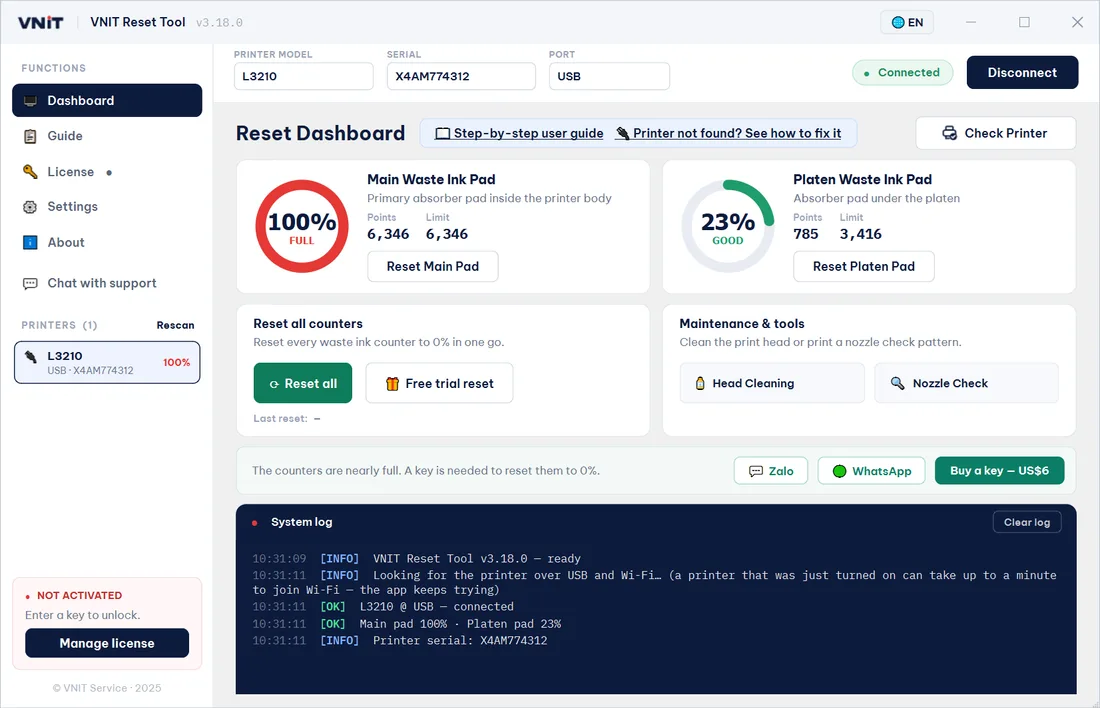
Plug in the USB cable and press Check Printer. You see the model, serial and exactly how full each counter is.
Try one reset
At 90% or above, a trial reset drops the counter to 80% and clears the error. Once per printer.
Reset to 0% with a key
Pay by card or PayPal. The key is emailed automatically. Enter it, reset, then switch the printer off and on.
Which lights are blinking?
The pattern differs from model to model. On the Epson L3210, the user's guide says:
- Ink + paper lights flashing togetherAn ink pad is at the end of its service life. The tool fixes this.
- Ink + paper lights flashing in turnThe borderless-printing ink pad is full. Also resettable.
- All lights flashingPaper or packing material is stuck inside. Not the ink pads: open the cover and remove it.
Not sure? Read the counter free. At or near 100%, the pads are the cause. More on the lights.
Source: Epson L3210 product light status.
Not every Epson can be reset in software.
Some newer models collect waste ink in a replaceable maintenance box with a chip. On those, you replace the box or reset its chip with a hardware chip resetter; no PC software helps. We tell you that before you pay.
Illustration: the reset changes the number, not the sponge.
A reset clears the counter, not the pads.
The pads inside keep the ink they have absorbed. If they are soaked, wash and dry them, replace them, or fit an external waste ink tank, so ink does not overflow onto the board later.
What to do with the pads after a reset →One key, one reset. Keys never expire.
Card or PayPal · checkout by Gumroad · local tax may apply
Reset printers for a living? Buy keys in bulk, or earn by recommending the tool.
Wholesale packs with a reseller dashboard, or an affiliate link that pays commission on every sale it brings.
Questions people ask first
Still unsure? Send your model on WhatsApp and a technician replies in English. All questions.
Is it free to try?
Yes. Downloading the tool, reading your counter and one trial reset per printer cost nothing. The trial drops the waste ink counter to 80% when it is at 90% or above, which clears the error so the printer prints again. A key resets the counter all the way to 0%.
My key has not arrived. What now?
Check your spam or promotions folder first. Then open My keys to send your keys to your inbox again, or message us on WhatsApp with the email you paid with.
Do I need a USB cable, or does it work over Wi-Fi?
Use a USB cable. It works on every supported printer. Reading and resetting over Wi-Fi works on a few models only, for example the L805. Most models, including the L5290 and ET-2800, answer over Wi-Fi but do not let the counter be read or reset that way. If the tool cannot read your printer over Wi-Fi, plug in the cable. The app is not broken.
Will a reset fix streaks or missing colours?
No. Print quality problems come from the print head, not the counter. The tool has a head cleaning and a nozzle check button that may help.
Windows warns me about the file. Is it safe?
Windows shows “Windows protected your PC” for software that is not code-signed yet. Click More info, then Run anyway. Some antivirus programs also flag small tools like this by mistake. You can check the file’s SHA-256 against the one on our download page. More about safety.