
Download VNIT Reset Tool, the Epson resetter
Version 3.18.0 · released 2026-10-28. Free to download. Reading your counter and one trial reset per printer are free too. You only pay US$6 if you want the counter at 0%.
- 1Download and unzipWindows: right-click the zip → Extract All, then open the VNIT_Reset folder. Mac: double-click the zip.
- 2Open it — expect one warningWindows or macOS may warn about a new app. What to click.
- 3Connect USB, press Check PrinterFree. Then reset: free trial to 80%, or 0% with a key.
On your phone now? We'll email you the download link to open on your computer.
Sent. Open the email on your computer.
Too many requests. Please try again in a few minutes.
That does not look like an email address.
We could not send the email just now. Please try again later.
Choose your download
Windows 10 / 11 (64-bit)
For almost every PC made in the last ten years.
0/66 VirusTotal: none of 66 security engines flag this file · checked 28 Oct 2026 · see the report
Download .zip (33.9 MB)SHA-256 checksums
61AA052B8B83FB7E9342D5EB2378A5D4841B95989B4C87B60D6AD20C84B6EEFD2D745EB41DC0AF63A447B39094A9039D3BDE269F779FB5B657090B92ED153249Windows 7 and older PCs
Runs on Windows 7, 8, 10 and 11, both 32-bit and 64-bit. Use it if the recommended download does not start on your PC.
0/65 VirusTotal: none of 65 security engines flag this file · checked 28 Oct 2026 · see the report
Download .zip (31.9 MB)SHA-256 checksums
C68418B77B470BA2575A444D330A7DB47A1223BAA150AFE8ED6DF592E50685823418121C3A4B2D6298F5308CB05C5AC4F43B298A89FFFF45F0BF3664CFCF6B49macOS 11 or newer
One app for every Mac: Intel and Apple silicon (M1 and newer). Connect the printer with a USB cable.
0/66 VirusTotal: none of 66 security engines flag this file · checked 28 Oct 2026 · see the report
Download .zip (79.6 MB)SHA-256 checksums
4124ACA0DDA42EFCA771E6C88792D7F352B1B10573A859078B17E9E8891E0BE1F684EA74676B9588DDAD54FF6D6ADC91448BB9E4B0D269D70ED5E75FBFB1301FNot sure which Windows you have? Press Windows + Pause, or open Settings → System → About and look at “System type”. 64-bit Windows 10 or 11 → the recommended download. Windows 7, or any 32-bit Windows → the second one, which also runs on 64-bit PCs.
You will need a USB cable
Reset over a USB cable. Wi-Fi works on a few models only and the connection can drop out, so use USB on every model, including the L3250, L5290, L4260, ET-2800 and ET-2850. Use a printer cable (square USB-B plug on the printer side). Laptops with only USB-C ports need a USB-C to USB-B cable or an adapter.
Rather not do it yourself?
A technician connects to your computer remotely and resets the printer while you watch. US$10, key included. Full refund if a supported printer can't be reset.
Install and first run on Windows
- 01Unzip the file firstRight-click the zip, choose Extract All, and open the new folder, then the VNIT_Reset folder inside it. Running the tool from inside the zip stops it saving your key.
- 02Run VNIT_Reset.exe, and click past one warningThe file with the VNIT icon, among many library files the app needs. Keep them together: do not copy the .exe alone to the desktop (make a shortcut instead). No installer and no admin rights. The tool is not code-signed yet, so Windows shows “Windows protected your PC” the first time: click More info, then Run anyway. This is not a virus detection, and you do it once per version.
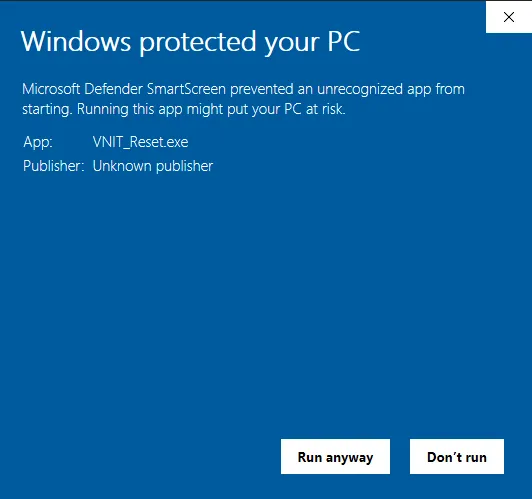
- 03Connect the printer with a USB cableSwitch the printer on and wait until it is quiet. The computer needs internet. Windows 11 with an EcoTank ET model (ET-2800, ET-4800…): if it prints but the tool can't find it, turn off Windows Ready Print first. Still not found? Printer not found: every fix.
- 04Read the counter, then decideAt 90% or more you can run the free trial (to 80%). For 0%, buy a key (US$6).
Chrome says “This file may be dangerous”?
Chrome can warn about a download it has not seen many times yet, for example in the first days after a new version. Open Chrome's download list (the arrow at the top right, or Ctrl + J), then next to the file choose Download suspicious file (on some versions Keep). More about this warning.
Resetting does not empty the pads
After any reset, check the ink pads. Soaked pads need washing, replacing or an external waste tank. How to handle the pads.
In PowerShell, run Get-FileHash .\VNIT_Reset_3.18.0_x64.zip and compare with the SHA-256 under its download. Is it safe?
Step by step with screenshots: reset on Windows · the user guide. Need an older version? Contact us. See what changed in each release.
Install on a Mac
- 01Unzip and openDouble-click the zip (Safari may unzip it for you), then double-click VNIT Reset in the folder. No need to move it to Applications. The folder also has a “READ ME FIRST” file with these steps.
- 02Allow it the first timemacOS warns about apps downloaded outside the App Store. On macOS 15 or newer: press Done (or OK), then go to System Settings → Privacy & Security, scroll down and press Open Anyway. On macOS 14 or older: right-click the app, choose Open, then Open. You only do this once.
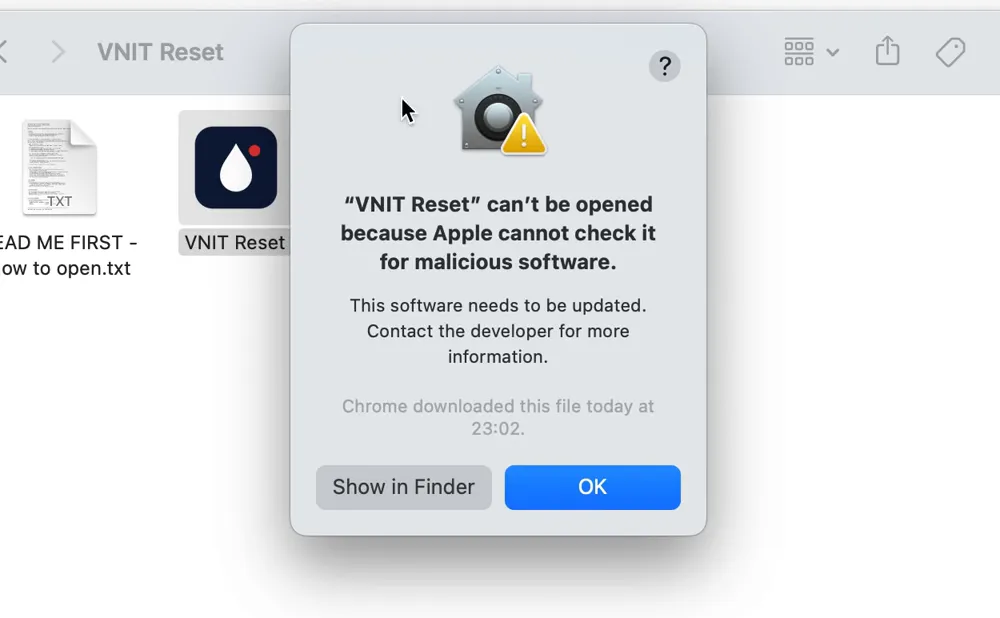
- 03Connect with a USB cableWi-Fi works on a few models only (for example the L805) and can drop out, so USB is the reliable way. If you try Wi-Fi, press Allow when macOS asks to let VNIT Reset find devices on your local network.
- 04Printer on USB says “busy”?Open System Settings → Printers & Scanners, open the Epson print queue and press Pause, then check again. Resume it after the reset.
If macOS says the app “is damaged”, open Terminal, type xattr -dr com.apple.quarantine (with a space at the end), drag the VNIT Reset app into the Terminal window, press Return and open the app again. To check the zip, run shasum -a 256 VNIT_Reset_macOS_3.18.0.zip in Terminal.
Full guide with screenshots: resetting an Epson on a Mac (Intel and Apple silicon).