
What the message looks like
Epson words it differently depending on the printer and where you see it. These are the versions quoted in Epson’s own support pages and user’s guides:
| Where you see it | What it says |
|---|---|
| On the computer (Epson printer software) | “A part inside your printer is at the end of its service life. Service is required.” |
| Other Epson support wording | “Parts inside the printer have reached the end of their service life”, “Epson Service required”, “Waste ink pad full”, “Ink pad at end of service life” |
| Printer screen, WorkForce models | “A printer’s ink pad is at the end of its service life. Please contact EPSON Support.” |
| EcoTank with a small screen, for example ET-2760, ET-2800 or ET-4800 | Code E-11 (ink pad needs replacing) or W-11 (ink pad nearing the end of its life) |
| Printer without a screen, for example XP-231 | Lights flash in a set pattern: on the XP-231, the power light is on or flashing while the ink and paper lights flash |
The light pattern is different on every model. Check the user’s guide for yours, or read the counter as shown below.
“Nearing the end” or “at the end”
Epson printers warn in two stages.
- Nearing the end (for example W-11, or “…is nearing the end of its service life”). You can still print. Epson’s guides say to press the start or copy button to carry on. This is the time to plan, before the printer stops.
- At the end (for example E-11, or “…is at the end of its service life”). The printer stops printing until the pads are serviced or the counter is reset.
Is it really the ink pads?
On Epson’s consumer inkjet printers, the “part” in this message is almost always the waste ink pads. Epson says most people never see it, but printers that print a lot, or that are several years old, can reach it before anything else wears out.
The printer does not measure how wet the pads are. It counts the ink it sends to them, and stops when that count reaches a limit. You can check the count yourself, for free:
- Download VNIT Reset Tool for Windows or Mac.
- Connect the printer with a USB cable, switch it on and press Read counter.
- If a waste ink counter is at or close to 100%, the message is about the ink pads.
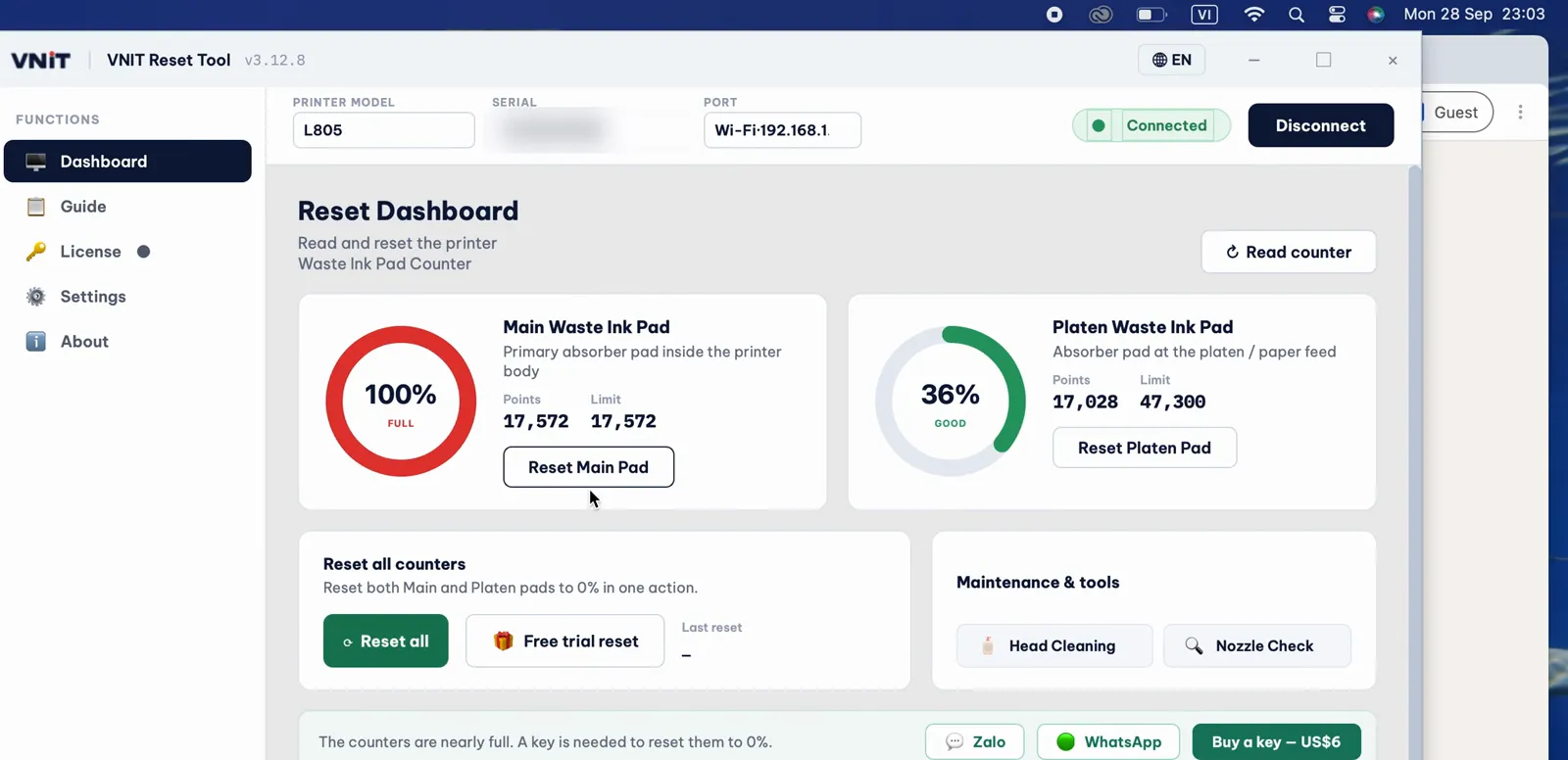
A real reading from an Epson L805: the Main pad counter is at 100%, so the printer stopped with the service message.
If every counter is well below 100% and the message is still there, the problem is something else. In that case, contact Epson or a repair shop.
Printers with a maintenance box
Some Epson printers do not keep waste ink in fixed pads. They use a replaceable maintenance box, and the message says so, for example “The maintenance box is at the end of its service life. You need to replace it.” Software cannot reset these. Fit a new box, or reset the box’s chip with a chip resetter (that does not empty the box). How to tell which one your printer has.
How to clear the message
| Option | What happens | Good to know |
|---|---|---|
| Epson service | Epson replaces the ink pads and resets the counter | Epson US offers this with shipping both ways. Cost and waiting time vary by country |
| A local repair shop | The technician replaces or washes the pads and resets the counter | Ask them to check the pads, not only the counter |
| Reset the counter yourself | VNIT Reset Tool: a free trial takes the counter down to 80% once per printer, a US$6 key takes it to 0% | Then check the pads yourself. See below |
After any reset, switch the printer off with its power button, wait about 10 seconds and switch it on again. The printer only reads the new counter after a restart.
Why Epson stops the printer
Epson explains that the printer stops on purpose, at the point where carrying on could make ink leak out of the printer. A reset only clears the count. The ink the pads have already soaked up stays inside.
So after a reset, look at the pads. If they are soaked, wash or replace them, or fit an external waste ink tank. How to handle the pads after a reset.