
You searched for a resetter for your Epson, downloaded a file, and now something is in the way: it asks for a password, it will not unzip, or your antivirus removed it. Each of these means something different. Some are harmless. Some mean you should delete the file now.
Quick answer: which problem do you have?
| What you see | What it usually means | What to do |
|---|---|---|
| The ZIP or RAR asks for a password that is posted on the download page, in a video or in a comment | The archive was locked on purpose. Antivirus and browsers cannot look inside an encrypted archive | Treat it as a warning sign. Read why |
| “CRC failed” or “The file is corrupt” when you unzip | The archive is damaged, the download stopped early, or the password is wrong | Download again from the maker’s own site. Details |
| The page tells you to turn off your antivirus first | You are being asked to remove your only protection before running an unknown program | Do not do it. Find another source. Details |
| Antivirus deletes or quarantines the file | Either real malware, or a false alarm on a new or unsigned tool | Check the file before restoring it. Details |
| Chrome says the file “may be dangerous” or is “uncommon” | Google has not seen this file many times yet, or found something in it | Check where it came from and its checksum. Details |
| “Windows protected your PC” (blue box) | SmartScreen: the program is unsigned or new. Not a virus detection | Check the checksum, then More info → Run anyway. Details |
| Windows 11 blocks it with no Run anyway button | Smart App Control: it blocks unsigned apps it cannot vouch for | Turn Smart App Control off, or use another PC. Details |
The file asks for a password
Many “free Epson resetter” and “Adjustment Program” downloads come as a ZIP or RAR with a password, and the password is printed on the same page or read out in a video. People then ask on forums what the password is.
There is a simple reason this is a bad sign. A password-locked archive is encrypted, so your antivirus and your browser cannot see the files inside until you type the password. Google’s own Chrome help lists files “that may try to evade detection, such as by hiding malware or viruses inside archive files” as suspicious downloads, and asks for the password of an encrypted archive so it can scan it.
A real software company has no reason to lock its download with a password it then publishes. Public malware sandbox reports also list copies of the Epson Adjustment Program shared this way as malicious. One example from ANY.RUN is in the sources below.
What to do:
- Do not go looking for the password. A working password does not make the file safe.
- Delete the archive and get the tool from the maker’s own website instead.
- If you have already run something from it, run a full scan with your antivirus and change passwords you typed on that PC since.
The VNIT Reset Tool download is a normal ZIP with no password. Its SHA-256 checksum is published on the download page, so you can check you have the real file.
“CRC failed” or “the file is corrupt”
Every file inside a ZIP or RAR carries a checksum (a CRC). When you unzip, the program works out the checksum again and compares. If they do not match, you get an error such as WinRAR’s “CRC failed in file name. The file is corrupt!”. WinRAR says this means the file data is damaged, either after the archive was made or while it was being made.
In practice, for a resetter download, it is one of these:
- The download stopped early or was damaged on the way. Download it again on a stable connection.
- The password is wrong. With an encrypted archive, a wrong password often shows up as a CRC error rather than a clear “wrong password” message (7-Zip even asks “Wrong password?” in its message). See the section above about password-locked downloads.
- Someone changed the archive after it was made, and it was uploaded again to a mirror site. That is exactly the kind of file you do not want.
- Antivirus removed a file from inside it while it was downloading, so the archive no longer adds up.
What to do: delete the damaged file and download again from the original website, not from a mirror, a file-sharing link or a link in a video description. If the same error comes back from the original site, contact the maker. Do not use “repair archive” on a resetter you got from a random site: a repaired archive can still be a modified one.
“Turn off your antivirus before you install”
Some download pages say this up front, often with “it is a false positive, don’t worry”. Do not do it.
A false alarm on one file is something you can check (see below) and allow for that one file or folder. Turning protection off for the whole computer lets anything in the download run without being watched. A safe tool does not need it.
VNIT Reset Tool runs with your antivirus on. If yours does flag it, you allow only its folder, after checking the file, as shown on Is it safe?.
Your antivirus deleted or quarantined the file
This happens with both real malware and with small tools that are new or not code-signed. Before you restore anything, check two things:
- Where did it come from? Restore only a file that came from the tool maker’s own website. If it came from a “free resetter” site, a mirror or a password-locked archive, leave it in quarantine.
- Is it the real file? Compare its SHA-256 checksum with the one the maker publishes. In PowerShell:
Get-FileHash .\the-file-name.zip. If the numbers match, the file is exactly the one the maker released. If they do not match, delete it.
If both checks pass, restore it. In Windows Security: Virus & threat protection → Protection history, select the quarantined item, then choose Restore (Microsoft’s steps are in the sources). Then add an exclusion for that one folder so it is not removed again. Tell the maker which antivirus flagged it: makers can report false detections to the antivirus company.
For VNIT Reset Tool, the checksums are on the download page and on Is it safe?, together with the current VirusTotal results for each file.
Chrome says the download may be dangerous
Chrome can block a download for different reasons. Google’s help page separates dangerous files (malware or deceptive software) from suspicious ones, which include files that are uncommon or unfamiliar. A new version of any small program is a new file, so it can show as uncommon for a while.
What to do:
- If the download came from a page that offers “all Epson resetters free”, let Chrome delete it.
- If it came from the maker’s own website, check the SHA-256 checksum after downloading. If it matches the published one, you can keep it from Chrome’s download list. Our Is it safe? page shows where.
“Windows protected your PC”
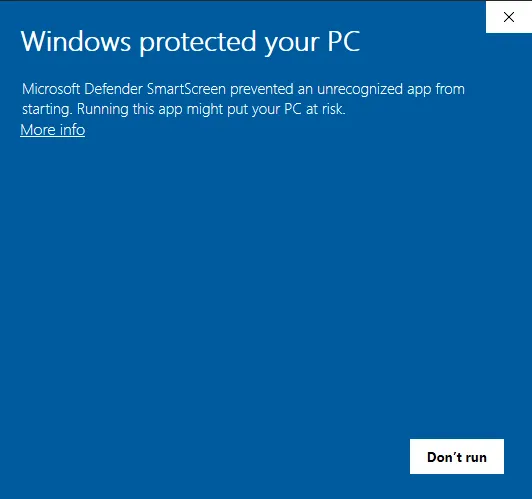
This blue box is Microsoft Defender SmartScreen. It appears for programs that are not signed with a code-signing certificate or that few people have downloaded so far. It is not a virus detection. Microsoft says files with an established reputation do not show it, which is why some PCs show the box and others do not for the same file.
For VNIT Reset Tool: check the checksum, then click More info → Run anyway. You do this once per version. Screenshots are in Reset an Epson on Windows. On a Mac the equivalent step is Open Anyway in Privacy & Security (Mac guide).
Blocked by Smart App Control
On some Windows 11 PCs, Smart App Control blocks the program and offers no Run anyway. Microsoft’s FAQ says it checks the app with Microsoft’s cloud service first and, if that is not conclusive, blocks apps that are unsigned. There is no way to allow one app. You can turn Smart App Control off in Windows Security, or run the tool on another computer. Steps and what to know before switching it off: Reset an Epson on Windows.
“Hundreds of resetters free” collections
Pages and archives that promise a resetter for every Epson ever made, free and “100% working”, are where most of the problems above come from. Two honest points:
- The Epson Adjustment Program is Epson’s own service software, one version per model. Copies passed around online are not distributed by Epson. What the Adjustment Program is.
- Newer printers that use a maintenance box cannot be reset by any software. They need a new box, or a chip resetter for the box. Box or pads?
A safer way to get the same result
What most people want is simple: see how full the waste ink counter is, and reset it if it is at the limit. With VNIT Reset Tool:
- The download is a normal ZIP from vnitreset.com/download, no password, with published SHA-256 checksums.
- It runs on Windows 7 to 11 and on macOS 11 or newer, with your antivirus left on.
- Reading the counter is free. Each printer also gets one free trial reset (a counter at 90% or more goes down to 80%).
- A full reset to 0% costs US$6 per printer. Pricing.
- Connect the printer with a USB cable for reading and resetting. Wi-Fi works on only a few models and is unreliable.
If the download works but the tool cannot see your printer, see Printer not found. For the three kinds of resetter and how to tell them apart, see Epson resetter: choose a safe one.
Sources
- Google Chrome Help: Google Chrome blocks some downloads (dangerous, suspicious, encrypted archives)
- WinRAR: Error message “CRC failed in file name. The file is corrupt!”
- Microsoft Learn: Restore quarantined files in Microsoft Defender Antivirus
- Microsoft Learn: Microsoft Defender SmartScreen overview
- ANY.RUN sandbox report: “EPSON Adjustment Program Resetter L130-L220-L310-L360-L365.rar” — malicious activity
- Microsoft Support: Smart App Control frequently asked questions