
Reset the Epson EP-802A waste ink pad counter
The EP-802A can be reset in software. VNIT Reset Tool reads its counters for free over a USB cable, runs one free trial reset, and resets to 0% with a US$6 key.
Windows or Mac · reading the counter is free · one free trial per printer
We'll email you the download link, so you can open it on your Windows PC or Mac later. Reading the counter is free.
Sent. Open the email on your computer.
Too many requests. Please try again in a few minutes.
That does not look like an email address.
We could not send the email just now. Please try again later.
Waste ink counters on the EP-802A
VNIT Reset Tool reads and resets these counters on the EP-802A. The printer stops when a counter reaches its limit.
| Counter | What it is | Limit |
|---|---|---|
| Main pad | The main absorber pad inside the printer body | 7,923 points |
| Platen pad | The pad near the paper path, used by borderless printing | 12,284 points |
The tool shows each counter as a percentage of its limit. 100% means full.
How the EP-802A tells you
When its waste ink counter is full, the EP-802A stops printing. On the computer you will usually see “The printer's ink pads are at the end of their service life” or “Service Required”; on the printer itself, error lights or a message on its screen. Nothing is broken: a counter has reached its limit.
Use a USB cable for the EP-802A
Reading and resetting over Wi-Fi works on a few models only. Connect it with a USB cable. If the tool finds the printer on Wi-Fi but cannot read the counter, the tool is not broken: plug in the cable and press Read counter again.
Reset the EP-802A on a Mac
The same app runs natively on macOS 11 or newer, on Intel Macs and Apple silicon (M1 and later), so you do not need Windows, Boot Camp or a virtual machine. Connect the EP-802A with a USB cable (MacBooks with only USB-C ports need an adapter). The first time, macOS asks you to confirm in System Settings → Privacy & Security → Open Anyway. Mac guide with screenshots · Which Epson reset tools run on a Mac.
Looking for the Epson EP-802A Adjustment Program?
The Epson Adjustment Program for the EP-802A is Epson's service software for repair technicians: one program per model, Windows only, with many functions besides the counter (EEPROM settings, head ID, alignment). Copies passed around online come from unknown sources and may be for the wrong model or region. If the EP-802A stops with the ink pad error, you only need its waste ink counters set back (Main pad, Platen pad). VNIT Reset Tool does that one job, on Windows and Mac, and reading the counter is free. What the Adjustment Program is · How to spot an unsafe download.
Step by step
- 01Download VNIT Reset Tool and unzip itWindows 7–11 or macOS 11+. Unzip it first: running it from inside the zip causes errors. Screenshots of every step: on Windows · on a Mac.
- 02Connect the EP-802A and press Read counterPlug in the USB cable. Wi-Fi works on a few models only, so use the cable. Switch the printer on. The tool shows the model, serial and each counter. The computer needs internet.
- 03Run the free trial, or enter your keyThe trial drops a 90%+ counter to 80%. A key resets it to 0%.
- 04Switch the printer off and on againSkip this and the printer still shows the old error.
Video: reset the EP-802A step by step
36 seconds, no sound. Recorded in the tool's demo mode for the EP-802A: the example key and serial number are not real. Connect your printer with a USB cable.
What you will see
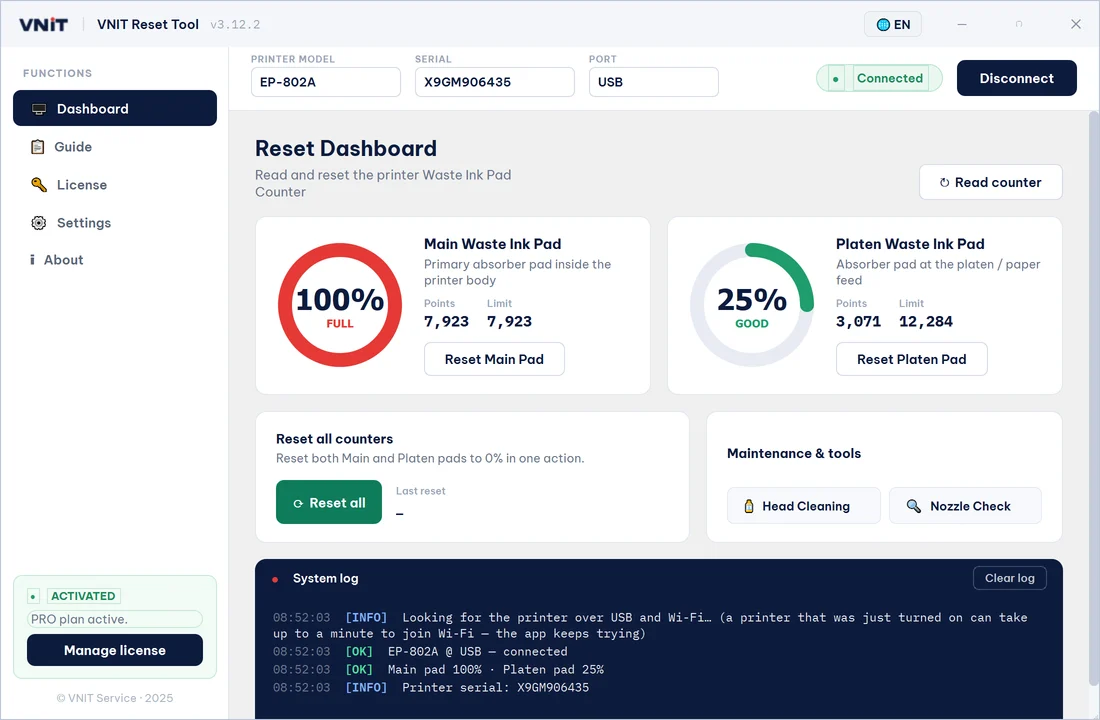
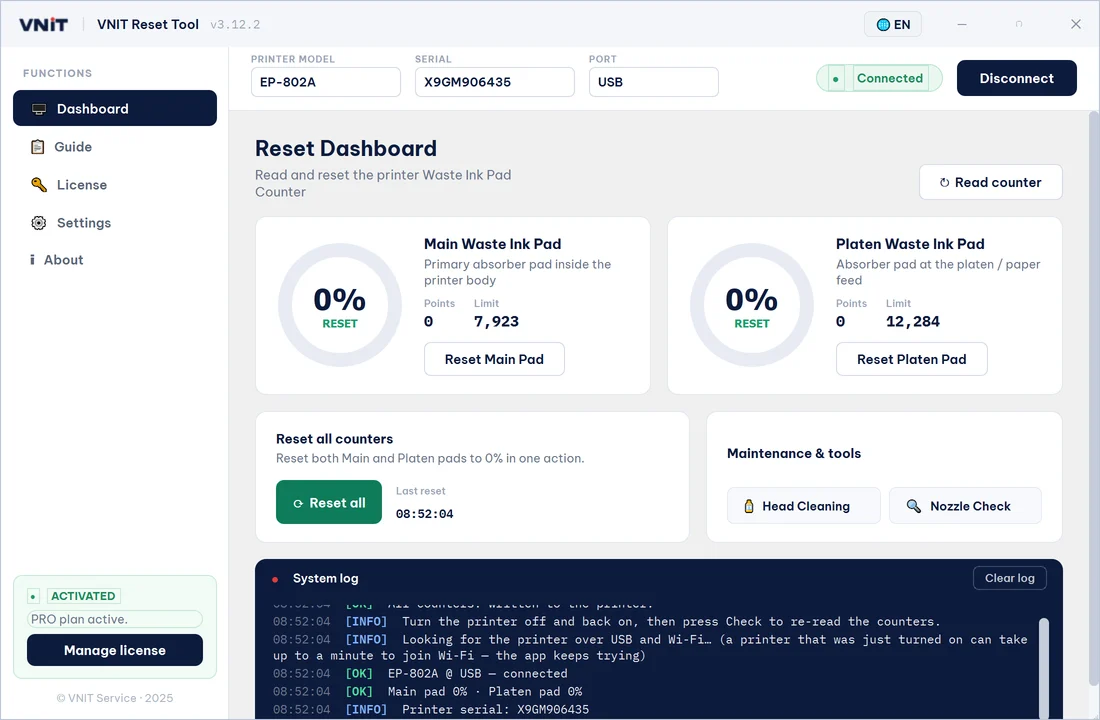
Screens from the tool's demo mode for the EP-802A. The serial number and counter values on your printer will be different.
After the reset: deal with the pads
The reset changes the counter, not the pads. If the EP-802A has printed a lot, wash or replace the pads, or fit an external waste ink tank, so ink cannot overflow. How.
EP-802A questions
Is this the Epson EP-802A Adjustment Program?
No. The Adjustment Program is Epson's Windows service software for technicians, one per model, with many service functions. VNIT Reset Tool only reads and resets the EP-802A's waste ink counters, on Windows and Mac, which is all the ink pad error needs.
The free trial worked. Do I still need a key?
Not straight away. The trial leaves the counter at 80%, so the error comes back sooner than after a full reset to 0% with a key.
Same reset family as the EP-802A
These models share the EP-802A's counters and reset the same way.